This is a quick and dirty test of the Turma Córmica and Cycles. I'll try to post more details about the setup and some overall fine tunes on the meshes, materials and poses on a next post, these meshes are optimized for the game engine not a full render.
I think these guys would look great as actual mini figures.
Wednesday, October 26, 2011
Tuesday, May 10, 2011
5 Centimeters Per Second - A painting in every scene.
Yesterday me and my wife watched 5 Centimeters Per Second. A beautiful anime directed by Makoto Shinkai that tells the story of Takaki and how he has dealt with relationships along his life.
I was once asked by a fellow friend and coworker, why did I prefer to do backgrounds and sceneries instead of "cool" characters and animations. I would probably have had a better answer by just showing him this anime, and what I'd be trying to achieve.
While watching it, I couldn't stop noticing how every shot was beautifully composed. Although some of them had no dialog, they had to exist, they told a story by them selves. I wold like to congratulate every one involved in this project, and I wish to be able to one day participate in such talented team of artists and maybe learn a bit.
Bellow are some random screen shots of the movie. All images belongs to Media Factory.
Thursday, February 24, 2011
Turma Cósmica
Loosely translated to english as "Cosmic Bunch" is the first set of educational computer games for children that I have worked on, and it was released this week here in Brazil.
My duties in the production were:
- Game design for all 2D games;
- Programming for about 60% of the 2D games;
- Sound editing for all of the 2D games;
- Illustrations and painting for the 2D and some 3D games;
- Modeling and texturing for some of the 3D games;
- Package design.
Below are some screenshots, and background illustrations with a brief description of my acting in each.
*Game design, programming and illustrations (except the character).
* Concepts, game design and background illustrations.
* Game design and illustrations.
*Game design and programming.
*Game design, programming and backgrounds.
*Game design and programming
*Concepts, slideshow painting, 3D modeling and texturing.
**All images belong to PUC-PR and Editora FTD
Sunday, February 20, 2011
Saturday, February 19, 2011
Mon - fur test
Well, after a long time I have finally something new to post.
This is Mon (monkey).
What started out as a quick and dirty test for Blender's fur. It actually ended up looking better than I thought so It was worth a little more effort at the end. But if I new that I was going to like it so much I would have probably done some steps differently.
Concept
The idea was to replicate a photograph I've seen of a small monkey on a tree branch, I thought that it would be a perfect example to try out the fur engine.
Modeling
I started the process by doing a very rough 3d sketch of a monkey in the classic T pose so I could rig it and then change it's pose as I wished, that way I could get the proportions a bit easier. Once rigged and posed, I separated the head mesh and sculpted the details only on the head. I've never even subdivided the rest of the body mesh for the final rendering since it was going to be all covered up. This process was so quick that I think I did it in less the a hour. After that I deleted the bones and made some final adjustments pulling the vertices around, specially because the rigging and skinning was so rough that I ended up having some bad triangles, etc.
Fur
The process for the fur was pretty straight forward, but since I was learning while making it I did had to go back and forth a few times. But most of all it all went well, Blender's fur tool are great for adjusting it's length, shape, combing, kink, etc.
At some point I reatached the head to the low poly body because I wasn't understanding how the fur shading was working, and for some reason there seemed to be a lack of shadow from the head's fur to the body's fur. But it was not, maybe it was the light setup that I had.
A few tips:
- I separated the fur according to vertex groups for easier grooming, like left arm, right arm, left leg, right leg, torso, tail and head, that way I could turn them on/off so I wouldn't groom the wrong part by accident. It may also help on "heavy fur" models, but in my case i had about 50 to 80 thousand strands on each of these parts and a lot of time I had all of them (~600.000) turned on and had no visual lag on the viewport, only when adding or removing strands, probably because Blender was trying to rearrange their children position and interpolation.
- Another useful feature was the ability to paint influences like fur density, length, clump, kink and roughness.
Looks
I painted the face texture directly inside Blender, and also spent no more than 15 minutes unwrapping and painting it , that can be easly noticed on the quality of the painting below. :-)
I used a sub surface scattering material and most of the texture's imperfection were not noticeable anymore.
![]() |
| Beautiful mapping :-) Can you spot the nose texture repeating on his left ear? |
The final render was done with 2 area lights and no global illumination or ambient occlusion, so it was really fast, about 6 minutes at 1920 x 1080 with 16 samples for anti aliasing on my Intel Core2duo.
Cheers,
Andz
Sunday, October 31, 2010
Visits to my blog.
After receiving some emails about this, I noticed that most of the visitors coming to my blog come from od[force] community. od[force] is a great place to hang out if your interested in real high end VFX, as a lot of people there are active in the industry and working in places like Dream Works, Sony Imageworks, Disney, SideFX and others.
Although I've been mentioning Blender a lot on my post I still use (and love) Houdini when ever I can, and have the free time of course :-)
I used to have a personal web page where I would post a lot of my tests done in Houdini, so I should start to post them here as well.
Below is a quick reel I was asked to come up with, related to TD :-| I make that "weird" face there because there is a relatively small amount of pretty images you actually produce when you're spending long hours trying to figure out how to optimize/create workflow than actually pressing the "render" button :-) And if you have the chance to press it, it usually is only a proof of concept without any decent texture or lighting.
Here it is anyways, the year was 2006 and the shots description follows below the video.
Scene 1 – Procedural City:
Procedural city builder done using basic stamp functions on Copy SOP. I kept the scene small (only 42 nodes).
Scene 2 – Particles:
Subdivided in two shots, the first was just a test with POPs but it still came out with a beautiful flow and structure besides its simplicity. The second scene is a small portion of a larger animation showing the flow of material inside an cement grinding mill. The final output was an interactive presentation for e-learning.
Scene 3 – Non Photorealistic Rendering Shader :
NPR has been one of my interests for ages because of my background in Painting. This was one of the tests to mimic comic book style rendering. Animations were all simple moves, but the intention was seeing its behavior to moving light and camera.
Scene 4 – Day to Night and 2D to 3D:
Two different projects with the same theme. The first challenge was to convert a simple day picture found on the net to a night shot. Later I decided to push this challenge a bit further by modeling the entire scene in 3D to make a camera movement.
Scene 5 – Unigraphics NX custom tool:
For the last few years I’ve been working with High End CAD systems for the industry as an instructor and solution provider. This is one example of a customization done for a client using GRIP, a macro language for NX.
Software used:
Houdini, UG-NX, Photoshop and Notepad.
Software used:
Houdini, UG-NX, Photoshop and Notepad.
Saturday, October 30, 2010
Blender house revision.
Here is a new try at rendering the house I made as a test drive for Blender's rendering engine.
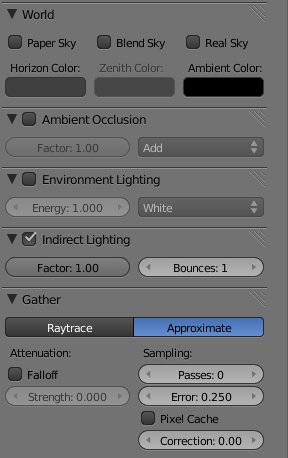
I had to render it in separate passes to composite it out in Photoshop. Also, the ambient occlusion pass was a complete re-render, because if I understood right, to be able to use the indirect illumination inside Blender, I was only allowed to use approximation gatherer.

And with that I wasn't satisfied with the ambient occlusion pass, as it was to blurry in my oppinion. So for the ambient occlusion pass I used the raytrace gatherer. It's crispiness was crucial for me to achieve the fine details in the corners of the mesh.
Things I would like to have in the renderer:
- Separate controls for ambient occlusion, environment lighting and indirect illumination.
- Pixel displacement. The rock wall around the garden still looks flat only relying on bump map and diffuse texture map. The ambient occlusion is not calculated considering the bump map.
If I continue refining this scene, i should:
- Work on some textures like the asphalt, it has a bad tiling.
- Try a new approach to the grass, maybe give a try at fur.
- Add more mesh details, maybe on the rock wall and try vertex displacement.
I'd love to hear some comments on how can I improve this scene in Blender.
Cheers,
Andz
Andz
Subscribe to:
Posts (Atom)