Páginas

Showing posts with label architecture. Show all posts

Wednesday, April 30, 2014

The Architecture Academy v1.5

After 7 months of a lot of work, The Architecture Academy v1.5 is about to start. Andrew Price just posted a teaser trailer.


Just like last time, my duties were to model furniture that will be used throughout the workshop and will be available for download so subscribers can use them in their own projects.

Together with Reynante Martinez, a fellow furniture modeler and Rob Garlington our supervisor and also plant modeler, we've made more than 100 new models and even went back to update/fix a few models from v1.0 that needed an uplift.

I hope you enjoy them.

Friday, July 12, 2013

Models made for The Architecture Academy - Blender Guru

Last year Andrew Price from Blender Guru, hired me to make some models for The Architecture Academy that just opened up this week.

The Architecture Academy is an online training portal packed with training videos, models and texture banks, ebooks and a forum ran by Andrew and is all related to the creation of architectural imaging.  Topics such as modeling, texturing, interior and exterior design principles, scene and cameras setup, artificial and natural lighting and setups for Blender's Cycles rendering engine will be covered.

Below are some of the models I did for this workshop and that the attendees will be able to download and use.

All of the models were done entirely in Blender and the textures were painted in Blender and Gimp. They are both open source software and really capable of doing a professional job.


Saturday, October 30, 2010

Blender house revision.

Here is a new try at rendering the house I made as a test drive for Blender's rendering engine.


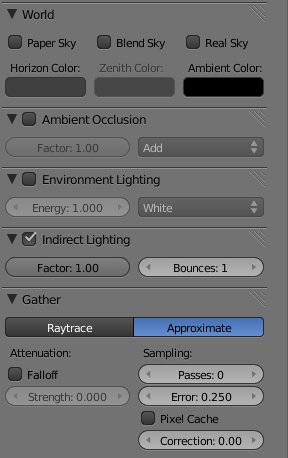
I had to render it in separate passes to composite it out in Photoshop. Also, the ambient occlusion pass was a complete re-render, because if I understood right, to be able to use the indirect illumination inside Blender, I was only allowed to use approximation gatherer. 


 And with that I wasn't satisfied with the ambient occlusion pass, as it was to blurry in my oppinion. So for the ambient occlusion pass I used the raytrace gatherer. It's crispiness was crucial for me to achieve the fine details in the corners of the mesh.


Things I would like to have in the renderer:
  • Separate controls for ambient occlusion, environment lighting and indirect illumination.
  • Pixel displacement. The rock wall around the garden still looks flat only relying on bump map and diffuse texture map. The ambient occlusion is not calculated considering the bump map.


If I continue refining this scene, i should:
  • Work on some textures like the asphalt, it has a bad tiling. 
  • Try a new approach to the grass, maybe give a try at fur.
  • Add more mesh details, maybe on the rock wall and try vertex displacement.
I'd love to hear some comments on how can I improve this scene in Blender.

Cheers,
Andz


Wednesday, October 27, 2010

First two Blender renderings.

These are the first two renderings of my tests in Blender.

First one is Tea Box, I was still learning the modeling and UV mapping tools. I was still having a hard time understanding the materials and textures at this time. There are some color bending on the background that I think is caused by a bad smoothing on the infinite plane.  If I spend time again on this file, I would redo the two tea bags on the right.


The second image is more recent, I just finished the rendering last night, but I'm still not 100% happy with the illumination and colors. Right now it has to much contrast, maybe because of the lack of indirect illumination. I also think that the colors don't look right, it looks almost like a painting.


  I'll be definitely trying a new rendering on this one.

So, things that I'm still trying to adjust my self in Blender:
  • Complex scenes organization;
  • Materials;
  • Lighting;
  • Rendering parameters.